


Table of Contents
- Quick Comparison: Best Affordable Gadgets for Daily Living
- Best Smart Home Gadgets for Beginners
- Must-Have Amazon Gadgets Under $20 for Every Home
- Portable Tech That Fits Your Daily Routine
- How to Choose Reliable Cheap Tech Without Getting Burned
- Accessibility and Inclusive Design: Affordable Gadgets for Every User
- Conclusion
Last Updated: August 11, 2026
Finding the best affordable gadgets for daily living matters more than ever. At MixVanta, we've curated this guide to cut through the noise. The real goal is value: devices that solve real problems, hold up over time, and fit naturally into a busy household.
Quick Picks:
- Best Smart Home Starter: Kasa Smart Plug Ultra Mini (EP10), easiest entry point into home automation
- Best Budget Streaming: Roku Express, no-frills HD streaming at a low one-time cost
- Best Portable Charger: Anker PowerCore 10000, high capacity, compact form factor
- Best Under $20 Reusable Tech: Rocketbook Core Smart Notebook, reduces paper waste, saves notes digitally
- Best Tracker: Tile Mate, simple, reliable, works with both Android and iOS
Quick Comparison: Best Affordable Gadgets for Daily Living
| Gadget | Price Range | Best For | Key Feature |
|---|---|---|---|
| Kasa Smart Plug EP10 | ~$24 (4-pack) | Smart home beginners | Voice control, scheduling |
| Philips Hue White A19 | ~$17-$60 | Smart lighting | Dimming, ecosystem integration |
| Wyze Cam v3 | ~$45 | Home security | Color night vision, IP65 |
| Roku Express | ~$15-$30 | Budget streaming | 1080p HD, simple setup |
| Rocketbook Core | ~$32 | Note-takers | Reusable pages, cloud sync |
| Anker PowerCore 10000 | ~$20-$25 | On-the-go charging | Fast charge, ultra-slim |
| JBL Clip 4 | ~$40-$80 | Portable audio | IP67, carabiner clip |
| Tile Mate | ~$25-$30 | Finding lost items | 250 ft Bluetooth range |
| Contigo AUTOSEAL Mug | ~$20-$35 | Commuters | Truly spill-proof design |
Best Smart Home Gadgets for Beginners
Smart home automation connects everyday appliances and lights to a network so you can control them remotely, set schedules, and reduce energy waste. The barrier to entry has dropped significantly, you no longer need a dedicated hub, an electrician, or a large budget.
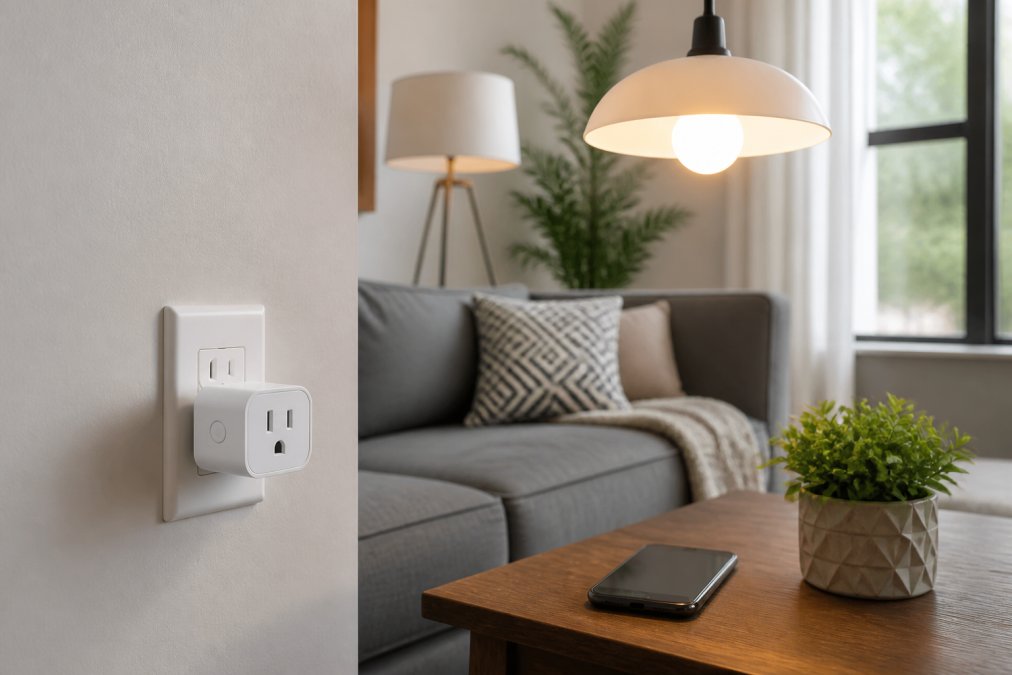
According to the U.S. Energy Information Administration's residential energy consumption data, standby power from idle devices accounts for a meaningful share of household electricity use. Smart plugs and smart bulbs directly address this by letting you cut power on a schedule or remotely.
Kasa Smart Plug Ultra Mini (EP10)
The Kasa EP10 is the most practical entry point into smart home automation. At roughly $24 for a four-pack, it costs less per unit than most single smart plugs. Setup takes about five minutes: plug it in, connect to the Kasa app, name your device, and you're done.
The ultra-mini form factor is the real selling point. Unlike bulkier smart plugs that block the second outlet, the EP10 leaves the adjacent socket free. Voice control through Amazon Alexa and Google Assistant works reliably, and scheduling is straightforward, set your coffee maker to start at 6:45 AM and forget about it.
Apple HomeKit users are out of luck, and the device requires a stable 2.4GHz Wi-Fi connection.
Pros:
- Very affordable in multi-packs
- Compact design preserves adjacent outlet
- Works with Alexa and Google Assistant
Cons:
- No Apple HomeKit support
- Requires Wi-Fi; no offline functionality
Philips Hue White A19 Smart Bulb
Philips Hue requires a separate Hue Bridge for full functionality, but the per-bulb cost on a four-pack becomes competitive. The warm white (2700K) output is genuinely pleasant, and dimming works smoothly through the app or voice commands. Full compatibility with Alexa, Google Assistant, and Apple HomeKit (with the Bridge) makes it the most universally compatible smart lighting option.
For a whole-home setup, Hue is the most reliable long-term investment.
Pros:
- High-quality, consistent light output
- Works with all major smart home ecosystems
- Energy-efficient LED technology
Cons:
- Requires Hue Bridge for remote access and full features
- Higher initial investment than basic smart bulbs
Wyze Cam v3
The Wyze Cam v3 delivers 1080p HD video, color night vision, two-way audio, and IP65 weather resistance for roughly $45. Color night vision is a genuine differentiator that makes footage far more useful for identifying people or vehicles.
Setup is handled entirely through the Wyze app. Some advanced features, including extended cloud storage and person detection, require a Cam Plus subscription. The free tier provides motion alerts and a 14-day cloud event history, which covers most household needs.
Pros:
- Excellent feature set for the price
- Color night vision sets it apart from competitors
- Easy app-based setup
Cons:
- Full feature set requires a paid subscription
- Wi-Fi dependent, dead zones are a real issue
Must-Have Amazon Gadgets Under $20 for Every Home
Budget-friendly tech under $20 tends to attract skepticism, but a handful of devices in this range deliver genuine utility. For streaming and note-taking specifically, the under-$20 segment holds up well.
Roku Express
The Roku Express is the most user-friendly streaming device for adding smart capabilities to an older TV without spending much. It streams in 1080p HD via HDMI and connects to thousands of free and paid channels. The interface is genuinely clean, with no algorithmic home screen pushing you toward paid content.
The real limitation is that 4K and HDR are off the table, and Wi-Fi is limited to 2.4GHz.
Pros:
- Very low one-time cost
- Intuitive interface, no learning curve
- Wide selection of free streaming content
Cons:
- No 4K or HDR support
- 2.4GHz Wi-Fi only
Rocketbook Core Smart Reusable Notebook
The Rocketbook Core turns a notebook into a tech gadget. Pages wipe clean with a damp cloth, and the companion app scans your handwritten notes and sends them directly to Google Drive, Dropbox, Evernote, or other cloud services. The writing experience feels close to paper, and a single Rocketbook replaces hundreds of pages of disposable notebooks over its lifetime.
Pros:
- Environmentally responsible design
- Easy cloud integration for organized notes
- Feels like traditional paper writing
Cons:
- Only works with Pilot Frixion pens
- Notes require manual scanning to digitize
Portable Tech That Fits Your Daily Routine
Portable tech proves its worth most visibly in daily use. The best portable gadgets solve a specific, recurring problem without adding friction to your routine. Simplicity is the feature.
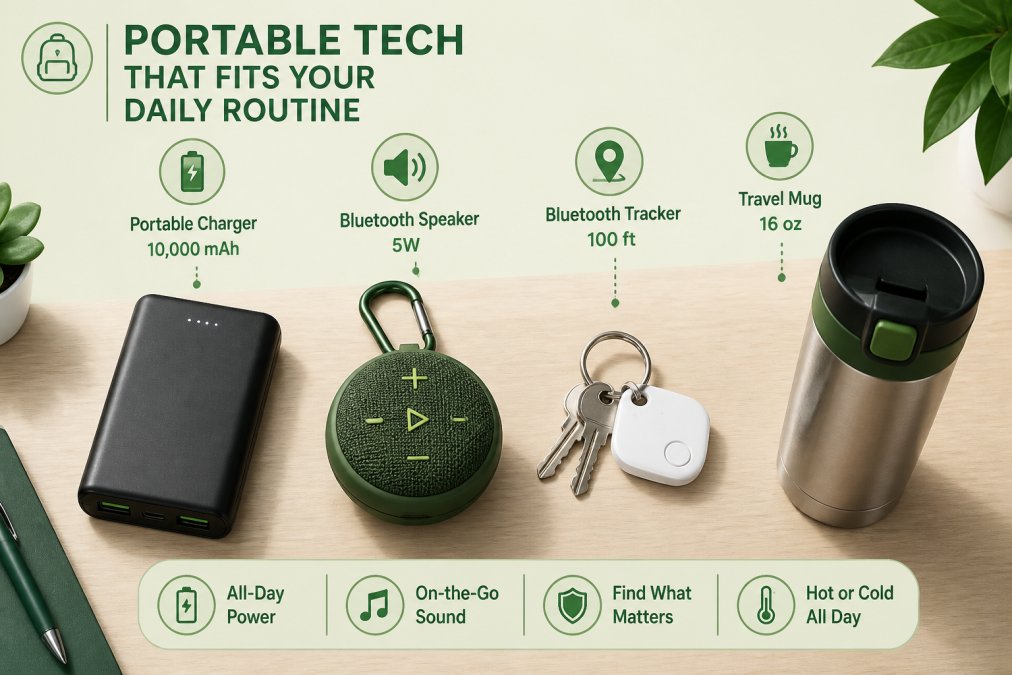
Anker PowerCore 10000 Portable Charger
The Anker PowerCore 10000 is the portable charger most people should buy. At roughly $20-$25, it provides enough capacity to charge a modern smartphone two to three times in a form factor that fits in a jacket pocket. Anker's PowerIQ and VoltageBoost technologies optimize charging speed for whatever device you connect.
The MultiProtect safety system handles surge protection, short-circuit prevention, and temperature control.
Pros:
- High capacity in a genuinely compact size
- Fast charging for connected devices
- Reliable daily-use durability
Cons:
- Slow to recharge the unit itself
- Included cable is basic
JBL Clip 4 Bluetooth Speaker
The JBL Clip 4 is the speaker you grab without thinking about it. The integrated carabiner clips to a bag, belt loop, or bike handle. IP67 waterproof and dustproof rating means it survives rain, the beach, and the kitchen sink. Up to 10 hours of playtime covers most day trips, and sound quality for its size is genuinely good.
However, there's no speakerphone function, which is a real omission.
Pros:
- Compact and highly portable with carabiner clip
- Excellent audio quality for its size
- IP67 waterproof and dustproof
Cons:
- No speakerphone or call-answering function
- 10-hour battery may fall short for all-day outdoor use
Tile Mate Bluetooth Tracker
The Tile Mate attaches to keys, bags, or any item you regularly misplace, and locates them via Bluetooth up to 250 feet away. The app is straightforward and works on both Android and iOS. The Tile network can help locate items beyond Bluetooth range using other Tile users' devices anonymously.
Location precision isn't as fine-grained as some newer competitors, and smart alerts require a Tile Premium subscription. For basic "where did I leave my keys" use, the free tier is sufficient.
Pros:
- Small and lightweight
- Works with Android and iOS
- Simple, no-learning-curve app
Cons:
- Location detail less precise than newer trackers
- Advanced features behind a paywall
Contigo AUTOSEAL West Loop Travel Mug
The Contigo AUTOSEAL West Loop is the travel mug that actually works. AUTOSEAL technology keeps the lid sealed until you press the button to drink, making it genuinely spill-proof and leak-proof. THERMALOCK double-wall vacuum insulation keeps drinks hot for up to 7 hours and cold for up to 18 hours.
One-handed operation is the practical differentiator for commuters. The Easy-Clean Lid opens fully for thorough cleaning, which solves the mold problem that plagues most travel mugs.
Pros:
- Truly spill-proof and leak-proof
- Excellent temperature retention
- Easy-clean lid design
Cons:
- Body is hand-wash only
- Price varies by size and retailer
How to Choose Reliable Cheap Tech Without Getting Burned
The biggest mistake people make with budget tech is treating price as the only filter. A $10 gadget that fails in two weeks costs more than a $30 gadget that lasts three years.
Check Certifications and Safety Ratings
Product certifications signal baseline quality. For electronics sold in the United States, look for UL listing (from UL Safety Certification standards) or FCC compliance markings. For waterproof claims, IP ratings are standardized: IP65 means dust-tight and water-jet resistant; IP67 means submersion up to 1 meter for 30 minutes. Any product making waterproof claims without an IP rating should be treated with skepticism.
For smart home devices, check whether the product has passed relevant safety testing. The Consumer Product Safety Commission product safety standards maintains recall databases and safety guidelines for household electronics.
Prioritize Integration Compatibility
Integration compatibility is the factor most budget-tech buyers overlook. A smart plug that doesn't work with your existing voice assistant becomes dead weight within a year.
Before buying any smart home gadget, confirm:
- Which voice assistants it supports (Alexa, Google Assistant, Apple HomeKit)
- Whether it requires a proprietary hub or bridge
- Whether the companion app has recent updates and reasonable user reviews
- Whether it uses standard protocols (Wi-Fi, Bluetooth, Zigbee, Matter) rather than a closed ecosystem
The Matter standard, developed by the Connectivity Standards Alliance, is making cross-platform compatibility more reliable for newer devices.
Sustainability and Longevity Signals
Cheap tech and sustainability aren't inherently at odds. A gadget that lasts five years is more sustainable than one that ends up in landfill after six months.
Look for these longevity signals:
- Repairability: Can you replace the battery? Are spare parts available?
- Warranty length: A one-year warranty is standard; two years suggests manufacturer confidence
- Software support commitment: Smart devices that stop receiving updates become security liabilities
- Build materials: Stainless steel, aluminum, and quality plastics outlast cheap composites
Accessibility and Inclusive Design: Affordable Gadgets for Every User
Accessible design is often treated as a niche consideration. It shouldn't be. Gadgets designed with accessibility in mind tend to work better for everyone.
The Contigo AUTOSEAL mug's one-handed operation benefits anyone carrying a bag or managing limited hand mobility. The Kasa Smart Plug's voice control via Alexa and Google Assistant is a genuine accessibility feature for users with mobility limitations. The Wyze Cam's two-way audio supports users who need remote communication assistance.
When evaluating affordable gadgets for households with diverse needs, apply these criteria:
- Does the device support voice control?
- Is the companion app compatible with iOS and Android accessibility features (VoiceOver, TalkBack)?
- Does the physical design require fine motor precision, or is it operable with limited dexterity?
- Is text on the device or app readable at standard sizes?
- Are setup instructions available in accessible formats?
The ADA National Network guidelines on accessible technology provides practical frameworks for evaluating whether consumer tech meets basic accessibility standards. Sensor-based devices like smart plugs and smart bulbs are particularly valuable for users with limited mobility, removing the need to physically interact with switches multiple times a day.
MixVanta's catalog spans household essentials, electronics, and lifestyle products across a range of price points, making it a practical one-stop destination for shoppers building out an accessible, tech-enabled home.
Conclusion
| Gadget | Best For | Longevity Signal |
|---|---|---|
| Kasa Smart Plug EP10 | Smart home beginners | Wide platform support, active firmware updates |
| Philips Hue White A19 | Whole-home smart lighting | Industry-leading ecosystem, long product lifespan |
| Wyze Cam v3 | Budget home security | IP65-rated, regular app updates |
| Roku Express | Secondary TV streaming | Simple hardware, software-driven value |
| Rocketbook Core | Eco-conscious note-takers | Eliminates ongoing notebook purchases |
| Anker PowerCore 10000 | Daily portable charging | Proven durability, safety certifications |
| JBL Clip 4 | Outdoor and travel audio | IP67 rating, integrated carabiner |
| Tile Mate | Finding lost items | Cross-platform, large tracking network |
| Contigo AUTOSEAL Mug | Spill-free commuting | Stainless steel construction, easy-clean lid |
Frequently Asked Questions
Are cheap smart home gadgets actually worth buying?
Yes, provided you stick to established brands with verified compatibility. Devices like the Kasa Smart Plug and Wyze Cam v3 deliver genuine automation and security features at a fraction of what premium brands charge. The key is checking that the gadget works with your existing setup, Amazon Alexa, Google Assistant, or Apple HomeKit, before you buy. A $6 smart plug that works reliably beats a $40 one that drops your Wi-Fi connection constantly.
What are some essential affordable gadgets for everyday life?
The most useful everyday affordable gadgets solve recurring friction points: a portable charger so your phone never dies mid-commute, a smart plug to automate appliances on a schedule, a Bluetooth tracker so you stop losing your keys, and a spill-proof travel mug that keeps coffee hot for hours. Each of these costs under $45, requires minimal setup, and delivers daily value from day one. Browsing a catalog like MixVanta lets you find these across categories in a single order.
What are the best tech gadgets under $50 for a more efficient lifestyle?
Under $50, the strongest picks for daily efficiency include the Anker PowerCore 10000 portable charger (around $20-$25), the Roku Express streaming device (starting under $30), the Tile Mate Bluetooth tracker (around $25-$30), and the Contigo AUTOSEAL travel mug (around $20-$35). Each addresses a specific time-saving or convenience need without requiring a subscription or complex installation. Prioritize gadgets that work with devices you already own to get immediate value.
How can small tech upgrades improve my daily routine?
Small tech upgrades reduce the number of decisions and manual steps in your day. A smart plug on a coffee maker means it starts before you get out of bed. A reusable smart notebook like the Rocketbook Core means your handwritten notes are searchable in Google Drive within seconds. A portable charger means you stop hunting for outlets. None of these require a large budget or technical expertise, and the time saved compounds across weeks and months of daily use.
How do I know if a budget gadget is actually reliable before I buy it?
Look for three things: FCC certification (required for wireless devices sold in the US), a return policy that gives you at least 30 days, and verified customer reviews that mention long-term use rather than just unboxing impressions. Brands like Anker, Wyze, Tile, and Kasa publish safety certifications openly. Avoid listings with no brand name, no warranty information, or reviews that all appeared on the same date, those are the clearest signs of low-quality or counterfeit products.
Building a smarter, more efficient home doesn't require a large budget, it requires choosing the right gadgets for the right problems. MixVanta brings together trending household essentials, electronics, and lifestyle products in one place, with free shipping options and global currency support so you see the real price before you check out. Shop Now at MixVanta and find the affordable gadgets that fit your daily routine.
This article was written using GrandRanker


